Immersion Begins With The Body
Designing virtual reality worlds that feel truly immersive starts with a simple truth: the player is not only looking at the world, they are physically inside it. Scale, comfort, reach, movement, sound, lighting, interaction distance, and object behavior all matter differently in VR than they do on a flat screen. A beautiful environment can fail if the player feels motion sick, cannot understand personal space, or tries to touch objects that do not respond. Immersion is not just visual richness. It is the feeling that the world respects the player’s body and expectations. The best VR spaces make presence feel effortless. They give players reasons to look around, move naturally, reach with confidence, and trust that important things are placed where the body can understand them. Before spectacle, VR design needs comfort, clarity, and believable response.
A: Start with one small project that can be finished and reviewed.
A: Add detail after the main structure, scale, and read are working.
A: Use enough to answer form, material, style, and context questions.
A: Helpful feedback points to a clear problem and a possible next change.
A: Keep a must-have list and move extra ideas into a later version.
A: Clarity, lighting, scale, and a view that shows the strongest choices.
A: Use them when they solve a real problem, not because they look impressive.
A: Save versions before big changes and at every stable milestone.
A: Return to the original promise and fix the largest weakness first.
A: It is complete when it meets the goal clearly enough to share, play, display, or learn from.
Design Around The Player’s Physical Reality
VR design begins with the body because the headset makes the player’s physical instincts part of the game. Players lean, turn, reach, step, duck, and inspect objects as if they occupy the space. If the world ignores those instincts, immersion breaks. A table that sits at the wrong height, a door that feels too narrow, or an object that cannot be touched despite looking reachable can all remind the player that the world is artificial.
This does not mean every VR world must be realistic. Stylized worlds can feel deeply immersive when their scale and responses are consistent. A floating island, magical workshop, or abstract puzzle chamber can still respect reach, distance, and comfort. The body needs rules it can learn.
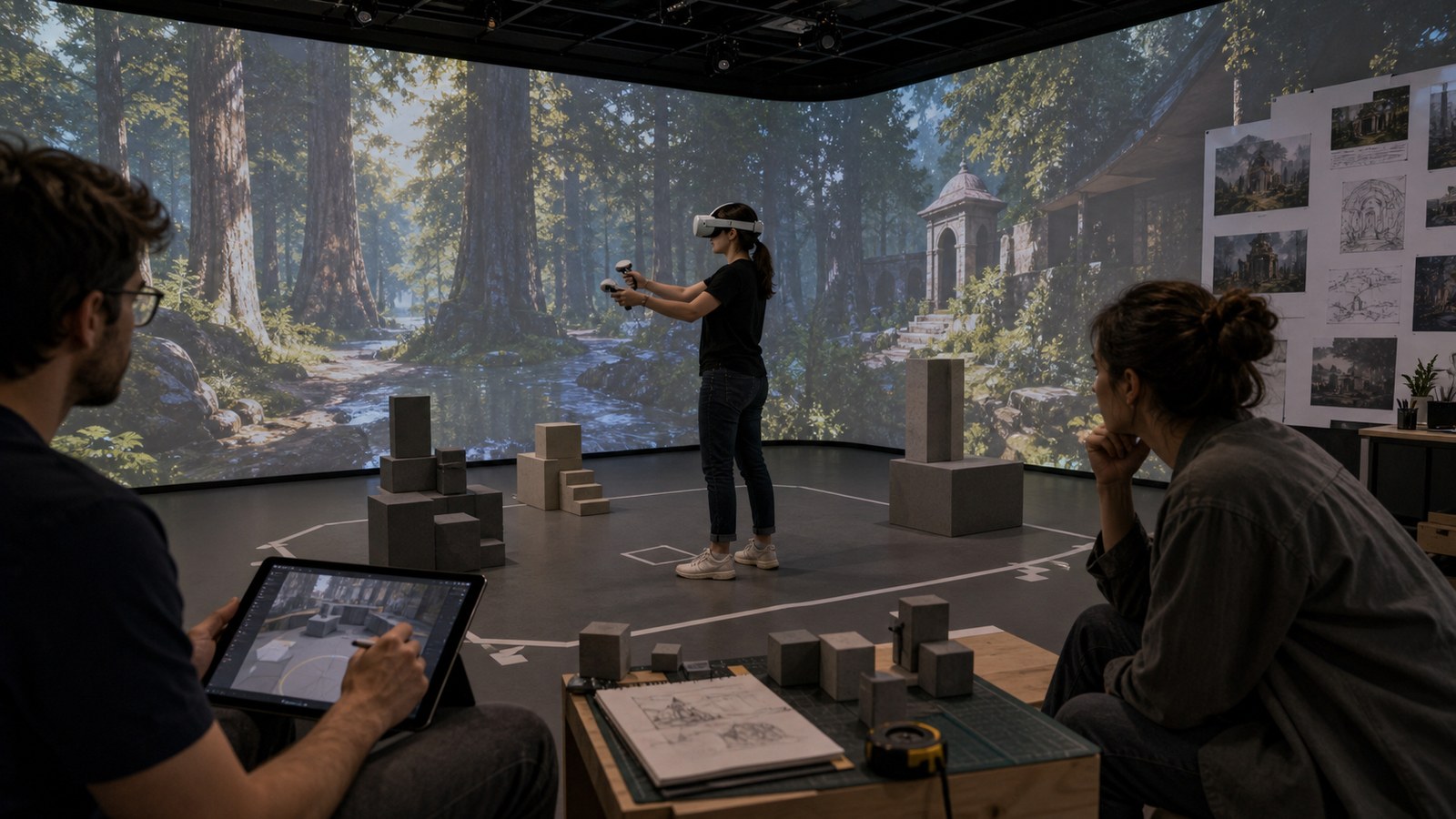
Designers should test scenes in headset early, not after final art. What looks fine on a monitor can feel enormous, cramped, or awkward in VR.
Use Comfort As A Creative Constraint
Comfort settings are sometimes treated as technical options added near the end. In VR, comfort should shape creative decisions from the beginning. Locomotion style affects level size, encounter pacing, object placement, and how players understand distance. A world designed for teleport movement will not feel the same as one designed for smooth locomotion or room-scale walking.
Comfort also affects emotional pacing. Fast artificial movement can create excitement for some players and discomfort for others. Tight spaces can create tension, but they can also make players feel physically trapped. Designers need to know which sensations are intentional and which are simply harmful friction. A comfortable VR world is not automatically slow or bland. It is a world where intensity is controlled carefully enough that players can stay present.
Make Scale Legible Through Familiar Anchors
Players understand virtual scale through comparison. Doorways, chairs, railings, tools, steps, trees, windows, and hand-held objects all help the body measure the world. Even fantasy environments benefit from familiar anchors because they let players feel how large strange things are. A giant statue becomes more impressive when the nearby doorway, table, or human-scale object makes its size readable.
Scale anchors should be placed where players naturally look and move. If a huge cavern has no readable human-scale elements, it may feel like a background image instead of a place. If a tiny workshop has believable tools and shelves, it can feel intimate and physical.
Wrong scale is one of the fastest ways to break presence. VR exposes proportion mistakes that flat screens often forgive.
Let Interaction Teach The World’s Rules
Interaction is where VR worlds become convincing. When players reach for an object, they are asking what kind of world this is. Does the cup move? Does the lever resist? Does the drawer open? Does the plant react? Does the tool make the expected sound? Every response teaches the player what to trust.
Not every object needs full physics. In fact, too much uncontrolled physics can create chaos. What matters is consistent affordance. If similar objects behave similarly, players relax. If some important-looking objects respond and others do nothing, players begin testing the interface instead of inhabiting the world. Strong VR design often uses fewer, better interactions. A small room with believable response can feel more immersive than a huge world where everything is static.
Guide Attention Without Flattening Presence
Traditional games can guide attention through camera cuts, UI markers, and forced framing. VR gives the player control of the view, so guidance needs to feel environmental. Light, sound, movement, contrast, object placement, character gaze, and spatial composition can all invite attention without stealing control.
The challenge is to make important moments noticeable from many possible head positions. A player may be looking at a shelf when an event begins behind them. Spatial audio, soft motion, or environmental reaction can turn attention naturally. The world should feel like it is calling, not yanking.
Designers should watch where players look during tests. VR attention is more personal and less predictable than screen attention, which makes observation essential.
Use Audio To Expand The Space
VR audio does more than decorate a scene. It tells players where things are, how large a room feels, what materials surround them, and whether something exists outside their view. A distant drip, muffled machine, bird call, footstep, or echo can make the world feel larger than the visible area.
Spatial audio can also reduce visual clutter. Instead of adding arrows or flashing markers, a designer can use a sound source to pull attention. This works best when audio behavior is consistent: sounds should feel located, occluded, and scaled to the environment. Good VR audio supports both immersion and usability. It helps players understand space while making that space feel alive.
Build Immersion From Trust
Immersion is ultimately a form of trust. The player trusts that the world will not make them sick, that scale will make sense, that objects will behave consistently, and that important events will be readable. Visual spectacle can deepen that trust, but it cannot replace it.
The best VR worlds often feel simple at first because their rules are clear. Then, as players gain confidence, the world can become more surprising, expressive, and ambitious. Trust creates room for wonder.
Designers should ask after every playtest: did players forget the interface and inhabit the space, or did they spend their attention fighting comfort, controls, and unclear rules? The answer reveals whether immersion is truly working.
Design For Hands As Much As Eyes
VR makes hands central to world belief. Even when controllers are abstract, players expect their reach and gestures to matter. Buttons, handles, tools, drawers, stones, doors, and instruments should sit where the body can approach them naturally. An object that looks interactive but sits at an awkward height can weaken presence immediately.
Hand design also affects emotional tone. A delicate artifact invites careful motion. A heavy lever suggests effort. A soft glowing plant invites curiosity. When interaction scale and feedback match the object’s fiction, players feel less like they are operating software and more like they are touching a place.
Give Players A Safe Way To Learn
VR players need time to learn the world’s rules without embarrassment or discomfort. A safe starting area can teach reach distance, teleport logic, grabbing, turning, menu access, and object response through play. This space should feel like part of the fiction rather than a disconnected training room whenever possible.
Early learning should avoid sensory overload. If players are still figuring out how to move, they may miss story, scale, or atmosphere. A calm first space lets the body settle. Once players trust the basics, the world can ask for more complex attention.
This includes accessibility and player preference. Some players want smooth turning, some need snap turning, some play seated, some stand, and some have limited reach. Immersion improves when the world welcomes these differences instead of assuming one ideal body.
Respect Personal Space
Personal space feels different in VR because objects and characters appear near the player’s body. A non-player character standing too close can feel aggressive even if the animation is friendly. A wall that clips near the face can feel uncomfortable. A menu that appears too near the eyes can feel intrusive. Designers need to choreograph distance carefully.
Respecting space does not mean avoiding intimacy or tension. It means using proximity with intent. A close whisper, narrow tunnel, or looming creature can be powerful when the player has enough comfort, context, and control. Without that care, closeness becomes annoyance rather than immersion.
Let The World Respond At Multiple Scales
Immersive VR worlds respond in small and large ways. A small object makes a sound when touched. A lantern changes when moved. A door opens and alters the route. A distant machine starts after a puzzle. These layers of response make the world feel connected, not merely decorated.
Large responses are more convincing when small responses have already taught trust. If every small object is static, a dramatic world event may feel scripted and detached. If the world has responded consistently, a larger change feels like the natural result of player presence.
Designers should also test what happens when players behave unexpectedly. They may crouch, lean into corners, wave objects, stare at ceilings, or ignore the intended path. VR invites natural curiosity, and the world feels stronger when it can absorb that curiosity without breaking.
Design The Edges Of The Play Space
VR immersion often breaks at the edges: physical boundaries, guardian limits, walls, menus, recentering, loading, and transitions. These moments remind players that they are between worlds. Designers cannot remove every edge, but they can make edges feel understandable and gentle. A boundary can be represented through furniture, railings, mist, water, or fictionally plausible limits rather than invisible frustration.
Transitions deserve special care. Moving from one area to another, opening a menu, pausing, or loading a new scene should preserve orientation whenever possible. Sudden dislocation can be uncomfortable and confusing. If the world must shift, the player needs a clear reason and a stable point of reference.
The edge design is part of the world’s manners. A respectful VR world tells players where they are, what changed, and how to regain control. That respect keeps immersion alive even when the system has to intervene.
The real goal is sustained presence. A dramatic first minute is easy to remember, but a comfortable, responsive, coherent ten-minute session is harder and more valuable. Immersive VR earns trust through many small decisions working together.
Teams should review these choices with the headset on and the build running at real performance, because presence depends on timing as much as layout. A grab that reacts half a beat late, a sound that feels detached from its source, or a frame hitch during a turn can undo careful world design. Technical polish and creative intent are connected in VR. The environment may be fictional, but the player’s body is responding in real time.
Small calibration passes can make a large difference here. Adjusting grab distance, hand offsets, object weight, sound timing, menu depth, and locomotion speed may seem minor on a task list, but those details are exactly where the player decides whether the world feels cooperative or artificial.
That careful tuning is often what lets wonder survive repeated playtests with confidence.
Let Presence Build Gradually
The most immersive VR worlds do not need to overwhelm players immediately. Presence can build through small trustworthy moments: a correct scale, a responsive object, a sound behind the shoulder, a comfortable route, a view that rewards turning around. Once those moments accumulate, the player begins to stop testing the system and starts inhabiting the world.